e-Signature PIN Issues
Print
Created by: Armando Huanasca Huanasca
Modified on: Mon, 22 Jun, 2026 at 2:05 AM
| Support Category: e-Signature PIN Issue |
IMPORTANT! - The DLC Administrators have informed us that auto-filling for e-Signature PINs has been disabled for security reasons. Users must enter the information manually.
- Depending on a user’s hire date, their e-Signature Username may not follow the standard lowercase-and-number format. Always check the user’s account directly to verify their exact username.
| SAMPLE TICKET: 64396 | The username is the first initial of their first name and their full last name, because they have been with the company much longer. |
|
HOW SHOULD WE ASSIST? - Confirm the exact e-Signature username listed on their account.
- Advise the user that e-Signature usernames are case-sensitive. If lowercase fails, have them try all CAPS, and vice versa.
- Disable Browser Autofill - If they are entering the correct Username and PIN manually and still having issues, their browser's autofill may be interfering. Suggest they disable it. Refer to the Chrome (Windows) | Disable Autofill SR for instructions.
- If users receive the following error message after entering their PIN too many times incorrectly, advise them to refresh the page and try again.
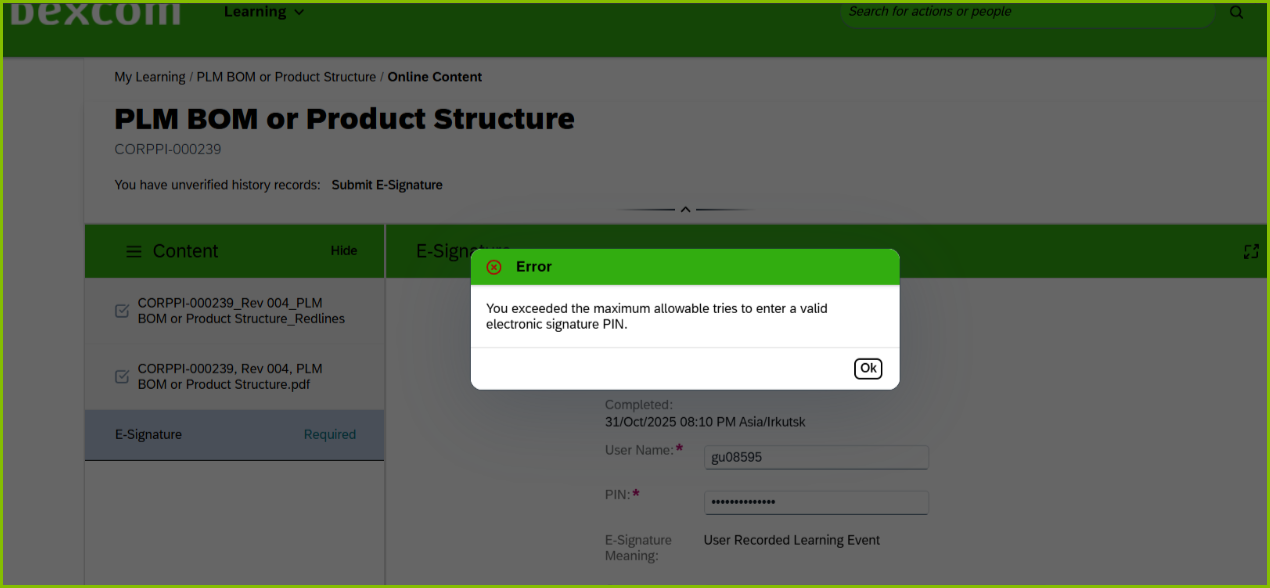
- If the issue persists after these steps, please escalate.
|
Armando is the author of this solution article.
Did you find it helpful?
Yes
No
Send feedback Sorry we couldn't be helpful. Help us improve this article with your feedback.
